
xeokit Data Engine
Read, edit and convert IFC. True to the source. At scale
xeoIFC reads, edits and writes IFC (IFC 2x3, 4, 4.3). Split and merge IFC files, extract true-to-source JSON, and convert your models to GLB, XKT and Esri® ArcGIS® scene layers, ready for your AI, web apps, GIS and automation workflows.
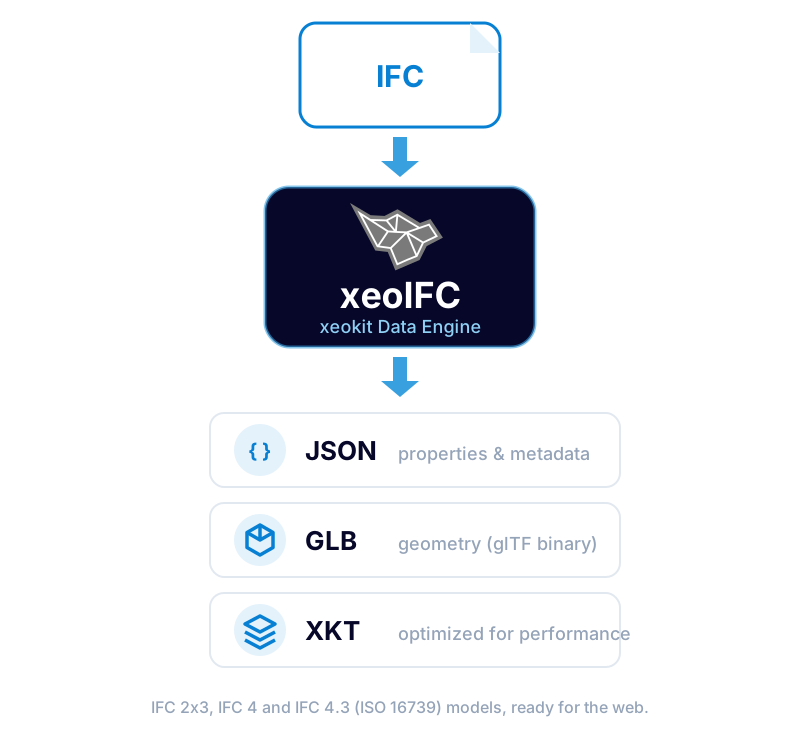
xeokit Data Engine for IFC
xeokit Data Engine takes your IFC files (IFC 2x3, IFC 4 or IFC 4.3, also zipped as .ifczip) and does more than convert them: it edits, splits, merges and writes IFC, and produces open, web-ready outputs and GIS layers.
Edit IFC
Query and change models through one document API: from scripts, from your own application, or with an AI assistant through the xeoIFC MCP server. Every call is checked against the IFC schema.
Write IFC output
Save edited, split, merged and newly authored models as IFC, or write lighter IFC that keeps GlobalIds, properties and the spatial structure: without geometry, or with the geometry hidden from outside removed.
Split & merge IFC files
Write a selection, such as one storey or all external walls, chosen by query, type or GlobalId, to a new IFC file. Or merge several IFC files, such as the disciplines of a federated model, into one: elements that share a GlobalId are merged.
GIS export for Esri® ArcGIS®
I3S scene layer packages for ArcGIS Pro, ArcGIS Online and the ArcGIS Maps SDK for JavaScript: several IFC files in one layer, placed on the globe from their georeferencing, with the IFC properties as fields.
XKT format included
xeokit's native format, written directly with the metadata embedded: no separate conversion step before you load your models with the xeokit SDK. GLB and glTF are written too.
True-to-source JSON
Element IDs, IFC classes, the spatial structure, property sets, quantities, materials, groups and units, extracted straight from the IFC model with their IFC types intact.
True to the source, with no intermediate format
xeoIFC writes the JSON straight from the IFC model, with no intermediate file format such as DAE in between. Each object keeps its IFC GlobalId, the same ID its geometry carries in the GLB, so data and geometry stay linked.
- GlobalIds, IFC classes and the spatial structure
- Property sets and quantities, with the IFC property and value type of every value
- Units in their IFC structure, so no information is lost
- Materials, groups and zones, and the IFC file header
#37926=IFCPROPERTYSINGLEVALUE('Base Offset',$,IFCLENGTHMEASURE(2.612),$);{
"name": "Base Offset",
"ifcPropertyType": "IfcPropertySingleValue",
"ifcValueType": "IfcLengthMeasure",
"value": 2.612,
"valueType": "number"
}Every output, IFC included, is written directly from the IFC model, with geometry reuse that keeps the files compact. The conversion can be tuned per job with a configuration file and a maximum file size limit.
Built for large IFC models
It handles large IFC files with high speed and memory efficiency: on a single workstation, xeoIFC converted 95 GB of real-world IFC, more than 2,200 files, in under 20 minutes (xeoIFC 1.0.21, October 2026). It does not require any authoring software or third-party cloud service to run, so you control where and how your BIM data is converted.
- ✕ Authoring software installation
- ✕ Third-party cloud service
- ✕ Intermediate file formats (DAE)
- ✕ Separate XKT conversion step
- ✓ xeokit Data Engine (standalone)
How can I use xeoIFC?
You decide where your IFC data is processed. Run xeoIFC in your own environment and software, including on-premises, for full operational independence:
On your own servers
Batch conversion and IFC jobs on your own servers, on-premises or in CI pipelines: a standalone command-line tool with no runtime dependencies, unattended in scripts and services.
Inside your own software
Load, query, edit, split and merge IFC inside your own desktop and server applications, in C++, C#, Python, Java and more, through a native library with a plain C interface (xeoifc.dll, libxeoifc.so).
Right in the browser
The xeoIFCLoaderPlugin, supplied with xeoIFC, loads .ifc and .ifczip files straight into your xeokit viewer in the browser, without a server-side conversion step and without uploading any data.
Prefer the full service? Creoox AG also offers xeoIFC as a managed web service, on shared or dedicated infrastructure.
The decision remains yours, for maximum flexibility and independence.
How to get started?
Use the API
The best starting point if you want to use xeokit Data Engine for IFC programmatically.
- Instructions in an open-source GitHub repository, plus credentials
- Examples for different job workflows
- A direct channel for feedback and roadmap alignment
View in xeoVision
Drop in your models, extract data and view them directly in the browser.
- A reliable, easy-to-use 3D and BIM viewer
- Open outputs generated from your models
- A seamless workflow powered by xeokit SDK and Data Engine
Where teams put xeoIFC to work?
- Share IFC models from any authoring tool with every project stakeholder, directly in the browser.
- View federated models from multiple disciplines together for openBIM coordination.
- Split and merge IFC models by discipline, storey or selection, and hand them on as IFC.
- Edit IFC with scripts, your own software or AI assistants, and author new models.
- Bring IFC models into Esri® ArcGIS®, placed on the globe with their IFC properties.
- Power web applications and digital twins, CDEs, construction project management, facility management, IoT and GIS-BIM platforms.
- Automate conversion of large IFC files in repeatable, scalable pipelines.
- Train your AI on data from your IFC models, or feed it straight into your AI workflows.
Why xeokit Data Engine?
Data sovereignty & control
Your IFC data belongs to you. Use it however and wherever you like, including AI, on your own terms.
Performance & scalability
Convert large IFC models quickly and with low memory usage, from single files to automated pipelines across projects.
Operational independence & security
Run xeoIFC in your own infrastructure, or use it as a managed service. The decision is always yours.
Frequently asked questions
Q: How is xeoIFC licensed, and what does it cost?
It depends on your application: how you use xeoIFC, where it runs and at what scale. Get in touch with us and we'll find the right license for your project.
Q: Does my IFC data leave my infrastructure?
No. The command-line tool and the native library run on your own servers and workstations, including fully on-premises, and the xeoIFCLoaderPlugin processes .ifc and .ifczip files in the browser, without uploading them. Your data only leaves your environment if you choose the managed service by Creoox AG.
Q: How does xeoIFC differ from xeokit-convert and similar tools, and what does it depend on?
Open-source libraries such as web-ifc and IfcOpenShell serve many projects well, as do commercial SDKs and cloud services. xeoIFC takes its own approach:
- Its own engine: no web-ifc, IfcOpenShell or other third-party IFC library or geometry kernel underneath, and no runtime dependencies.
- Proven reliability: refined over years of enterprise use and tested against thousands of real-world models, edge cases included.
- Performance: fast and memory-efficient, even with very large models.
- All in one: one engine edits, splits, merges and writes IFC, and exports JSON, GLB, XKT and ArcGIS scene layers.
- Dedicated support: experienced engineers from the Creoox team help you directly, from your first test to production.
Q: Can xeoIFC convert IFC to GLB, XKT or ArcGIS scene layers in one step?
Yes. One command turns .ifc or .ifczip files into GLB or glTF with the metadata as JSON, into XKT with the metadata embedded, or into an I3S scene layer package (.slpk) for ArcGIS, with no intermediate format and no separate xeokit-convert step. Several IFC files can go into one scene layer.
Q: Does xeoIFC keep GlobalIds and property sets when it splits, merges or exports models?
Yes. Split and merged IFC files keep the GlobalIds, property sets and quantities of their elements, and a merge turns elements that share a GlobalId into one. In the exports, the GlobalId links each element's geometry in the GLB or XKT with its data in the JSON, and ArcGIS scene layers carry every element's attributes and property sets as fields.
Q: Can an AI assistant edit IFC files with xeoIFC?
Yes. The command-line tool includes an MCP server, so AI assistants that support the Model Context Protocol can open, query, edit and save IFC files in the folders you allow, through the same document API as scripts and applications. Every call is checked against the IFC schema, and a mistake comes back with a hint the assistant can act on.
Get started with xeokit Data Engine
Request evaluation access and start transforming your BIM and 3D engineering data into open, web-ready outputs today.