Turn STEP data into open, web-ready outputs. Independently
xeoSTEP transforms your 3D engineering data from STEP (STEP/STP) into JSON, GLB and XKT, ready for your AI, internal knowledgebase, web apps, automation and other workflows.
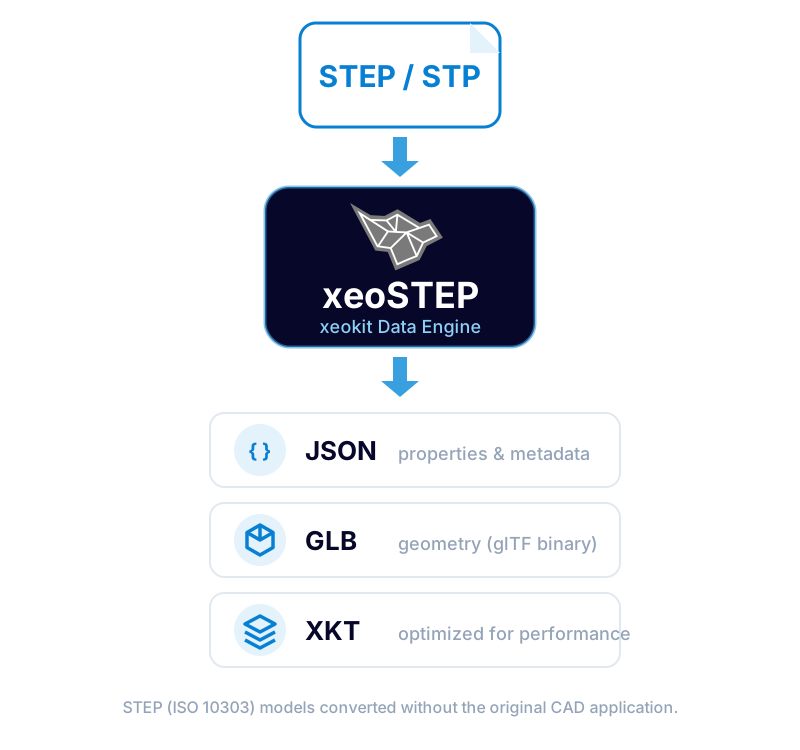
xeokit Data Engine for STEP
xeokit Data Engine takes your STEP file (ISO 10303, with a .step or .stp extension) and transforms it into open, web-ready outputs. The current pipeline produces these outputs:
Product structure & metadata
Containing the product structure, object properties and metadata, with structured access for integration, search and automation.
Binary glTF geometry
Binary glTF containing geometry, compact and standards-based for the broad 3D tooling ecosystem.
Optimized for the web
Optimized for efficient, high-performance visualization with the xeokit SDK in the browser.
The data from STEP is extracted directly and prepared with as little transformation as possible, and without forcing it through an intermediate exchange schema such as IFC. Parts and assemblies from mechanical, plant and product models can be viewed and combined with your BIM data in the same web application.
Runs on its own - without the original CAD software
xeoSTEP processes your data independently from any CAD vendor. It does not require the CAD application that created the STEP file, a CAD license, or a third-party cloud service to run, so you control where and how your engineering data is converted.
How can I use xeoSTEP?
We believe you should have the freedom to decide what happens with your data, and where it is processed. That is why xeokit Data Engine can be used in different deployment models. In principle, it can be:
Fully managed by Creoox AG as a web service
Deployed and operated in your own environment, including on-premises.
Whether you prefer a shared service or dedicated server infrastructure, an on-premises deployment, or even a simple standalone binary, we can support the setup that best fits your operational, security, and data-governance requirements.
xeokit Data Engine is currently available for Windows on AMD64, as well as Linux on both AMD64 and ARM64.
The decision remains yours, for maximum flexibility and independence.
How to get started?
Use the API
The best starting point if you want to use xeokit Data Engine for STEP programmatically.
- Instructions in an open-source GitHub repository, plus credentials
- Examples for different job workflows
- A direct channel for feedback and roadmap alignment
View in xeoVision
Drop in your models, extract data and view them directly in the browser.
- A reliable, easy-to-use 3D and BIM viewer
- Open outputs generated from your models
- A seamless workflow powered by xeokit SDK and Data Engine
Where teams put xeoSTEP to work?
Easily share STEP models with non-CAD users, across teams and tools.
Bring manufacturer products, equipment and plant components together with BIM models in one viewer.
Prepare STEP data for web applications and digital twins.
Reduce unnecessary conversions and help avoid data loss.
Power CDEs, product configurators, manufacturing, facility management and IoT platforms.
Train your AI on data from your STEP models, or feed it straight into your AI workflows.
Why xeokit Data Engine?
Data sovereignty & control
Your STEP data belongs to you. Use it however and wherever you like, including AI, on your own terms.
Accessibility & flexibility
Make STEP data easier to access, share, integrate and customize, even for users and systems that do not use CAD software.
Operational independence & security
Use xeoSTEP as a managed service or run it in your own infrastructure. The decision is always yours.
Get started with xeokit Data Engine
Request evaluation access and start transforming your BIM and 3D engineering data into open, web-ready outputs today.
Request Evaluation Access →