Xeokit Loaders & Converters

· 4 min read
Wojciech Radaczyński
Software Engineer @ Creoox

Introduction

To visualize the external 3D model inside the Xeokit, we have to convert it into Xeokit Scene Model.

There are various different conversion methods, some of them are fully open-source, some of them are proprietary. Some of them are super simple to use, while others are a bit more complex.

In this article I'd like to go through most of them, to make it easier to understand what are the possible options for now.

Bringing WASM Power to xeokit: The New cxConverter and Loader

· 4 min read
Dominik Szaradowski
Software Engineer @ Creoox

Bringing WASM Power to xeokit

In the ever-evolving landscape of web technologies, WebAssembly (WASM) has emerged as a powerful tool for enhancing performance and capabilities in web applications. At xeokit, we are excited to announce the integration of cxConverter and a new WASM loader into our ecosystem, aimed at improving the handling of large BIM and CAD models.

Building 3D Model Viewers with xeokit-webcomponents

· 8 min read
Marcin Feszter
Software Engineer @ Creoox

Integrating 3D models into web applications can be a complex task, often requiring extensive knowledge of WebGL

, 3D rendering pipelines, and model loading formats. However, with the advent of Web Components, this process has become significantly simpler. @xeokit/xeokit-webcomponents leverages this power, providing a set of easy-to-use, framework-agnostic custom elements for displaying and interacting with 3D models, particularly useful for BIM and IFC data.

In this blog post, we'll explore how to get started with @xeokit/xeokit-webcomponents and create a basic 3D model viewer.

Model transfer with dotbim + xeo.vision

· 3 min read
Wojciech Radaczyński
Software Engineer @ Creoox

Introduction

dotbim is a minimalist file format for BIM. It was created to simplify the description of BIM models as much as possible. Thanks to open-source community many different connectors and apps started to support this file format. You will find the whole list of supporting apps here: https://github.com/paireks/dotbim?tab=readme-ov-file#apps-supporting-bim

xeo.vision is an online 3D BIM Viewer. Once you drag & drop your model into xeo.vision it will display it, but also it will instantly make it possible to share this model via link or by QR code. Once you shared the model with your friend, he will be able to not only see it, but also to download it into their own computer. xeo.vision already supports .bim files, but also .ifc, .glb, .xkt, .las/.laz, .obj, .stl.

This combination makes it possible to share your geometry + metadata with your colleagues as simple as possible.

Let's take a look on the examples below.

Hatching sliced objects using xeokit SDK

· 10 min read
Muhammad Ijlal
Software Engineer @ Creoox

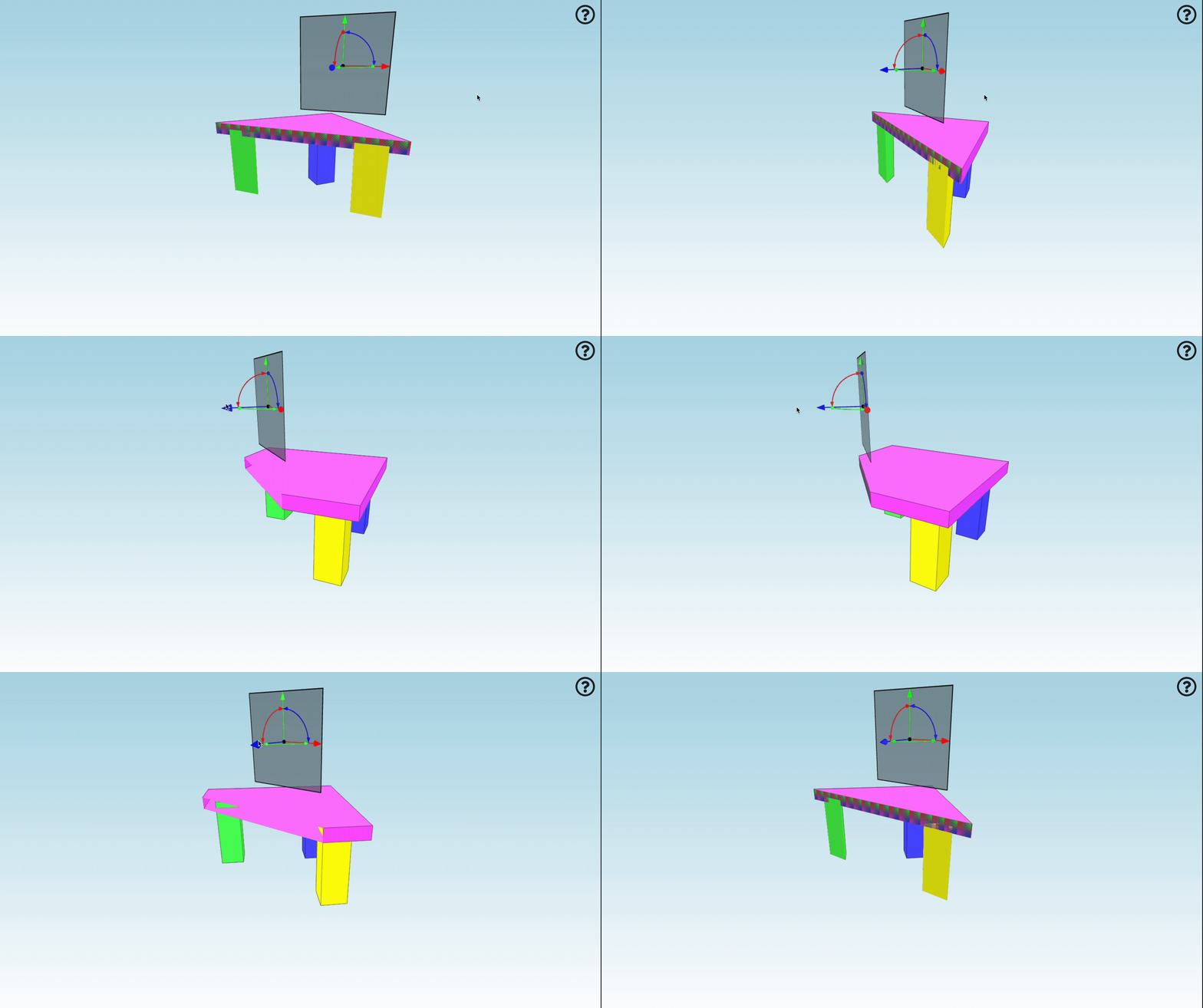
In this blog, you’ll be learning how to add hatching to sliced models using our powerful BIM xeokit SDK. Whether you’re creating architectural visualisations or complex engineering models, adding hatching to sliced sections can greatly enhance the clarity and visual appeal of your viewer.

Hatching Sliced Objects

We will walk you through the process of setting up your project, slicing the models, and applying hatching effects to those slices.

By the end of this guide, you’ll be able to:

  • Set up a basic BIM viewer using xeokit SDK.
  • Slice models dynamically to reveal internal structures.
  • Apply solid hatching to the sliced surfaces for improved visual representation.

Let’s dive right in and start with setting up the basic HTML structure for our example.

Controlling Camera using Device Orientation on Mobile Devices

· 5 min read
Muhammad Ijlal
Software Engineer @ Creoox

Introduction

Mobile devices offer exciting possibilities for immersive 3D experiences through their built-in sensors. In this tutorial, we'll explore how to control the xeokit camera using device orientation data, creating a virtual reality-like experience where users can look around a 3D model by simply moving their mobile device.

Important Requirements: This example only works on mobile devices and requires a secure HTTPS connection to access device orientation data. If you're testing locally, you can set up a secure context using http-server with SSL:

npm install -g http-server
http-server -S -C cert.pem -K key.pem

You'll need to generate SSL certificates for local testing to meet the browser's security requirements.

Loading property sets on demand in xeoVision - flexible handling of IFC metadata

· 9 min read
Dominik Szaradowski
Software Engineer @ Creoox

Loading property sets on demand in xeoVision

🔎 How to search IFC metadata without downloading gigabytes of data?

At xeoVision, we’ve developed an innovative approach to on-demand property set loading. 👉 Extracting metadata to JSON 👉 Converting it into lightweight SQLite databases 👉 Remotely reading data chunk by chunk from object storage

This allows even very large IFC models to be searched quickly, efficiently, and without heavy network loads.

📖 In the article, I explain the entire process — from cxconverter to remote VFS and data transfer optimization.

Backfaces in xeokit

· 3 min read

Introduction

On a triangle mesh geometry, backfaces are those faces which are oriented away from the viewpoint. Whenever possible, the xeokit viewer tries to avoid drawing backfaces, in order to reduce work done by the graphics hardware and speed up interactivity.

2D Overlay

· 6 min read

One of a commonly used features of a BIM viewer is displaying a 2D overlay (e.g. a floor plan) within the 3D model. This article demonstrates how such an overlay can be implemented with xeokit, by using general purpose abstractions provided by the SDK.